Your graph on your GitHub profile, and your own page at velocity.id8.one, in about a minute.
Get your own graph for your GitHub profile · about a minute
Type your GitHub username
Type it here: every button on this page fills in from it.
Velocity Radar records the username you type here, with the time, to count how many people use this guide;
only the site's owner sees it. Like the rest of the site, this page uses Google Analytics. The page also asks GitHub which of your public repositories holds your
profile README, and remembers the username in this browser.
Copy your snippetArcade light is the default. Arcade dark matches your Velocity Radar page. Both show the
same image to every reader; Classic, the original graph, turns light or dark with the reader's GitHub
theme.
Paste into your GitHub profile READMEThe button opens your profile README for editing: paste the snippet where you want the graph, then
press Commit changes. No profile README yet? It opens GitHub's new-repository page: name it
after you and tick Add a README file.Open your profile READMEWaiting for your GitHub username: type it at the top of the directions.Your page then appears at velocity.id8.one/stats/<you>. A username is
checked at most every ten minutes.Open your Velocity Radar pageWaiting for your GitHub username: type it at the top of the directions.
What the snippet alone gives: @AIMLPM's page
The graph on their GitHub profile, and the radar at the top of their page: where they rank among the
529 builders Velocity Radar follows, on six figures from GitHub's own calendar. Every figure here
is live.
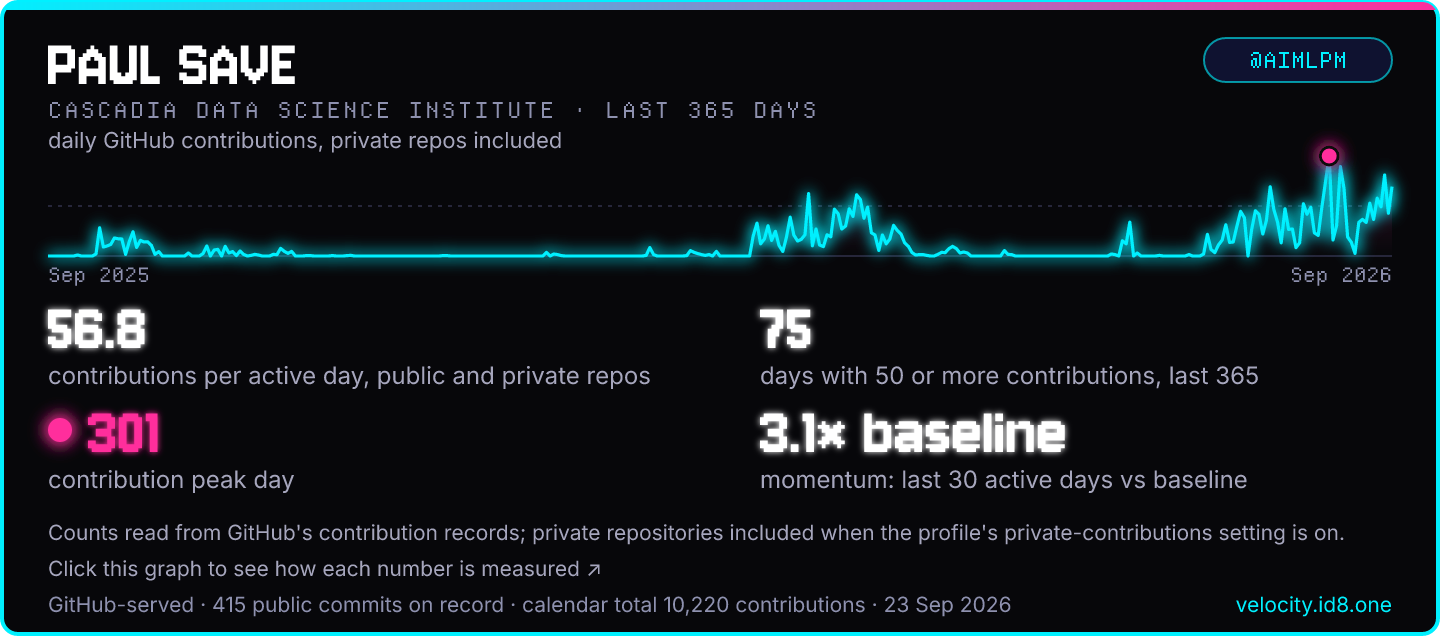
@AIMLPM's Velocity Graph in Arcade dark. The snippet offers three styles: Arcade light (the default), Arcade dark and Classic.
Contents · ranked against the 529 builders Velocity Radar follows
The radar
Each point is where @AIMLPM ranks among them over the same days: the edge means no one is above. The right half is Volume, the left half is Consistency; tap either to jump to its chapter.
Run the count in your own GitHub account and press Check my run: your page's Stamina chapter lights up with your real figures, private repositories included, their names never.
Snippet only
Stamina
Unbroken runlocked
Long stretchlocked
Middle daylocked
GitHub's calendar has daily totals, not commit times, so without a count there is no run, stretch or hour
of the day to show.
With a count · @AIMLPM, real data
Chapter 3 · beyond the radar
Stamina
iD8 counted
Read from their own repositories by the iD8 count, which they ran in their GitHub account; private repositories never leave it. Only people who ran it have these figures, so they are not ranked. How the count works
The longest run with a substantive commit in every hour lasted 45.1 hours, from 18 Sep 09:52 to 20 Sep 06:58 (America/Los_Angeles).
substantive commits in that hourovernight, 23:00 to 07:00 (America/Los_Angeles)
Long days
Time of day · share of substantive commits
How it's measured
count setup · 7 steps · about 10 minutes
1
Every button below fills in from it.
2
Check your snippet is on your profileYour page, and the count on it, show only while the snippet is on your profile.
How to add the snippetChecked when you type your username.
3
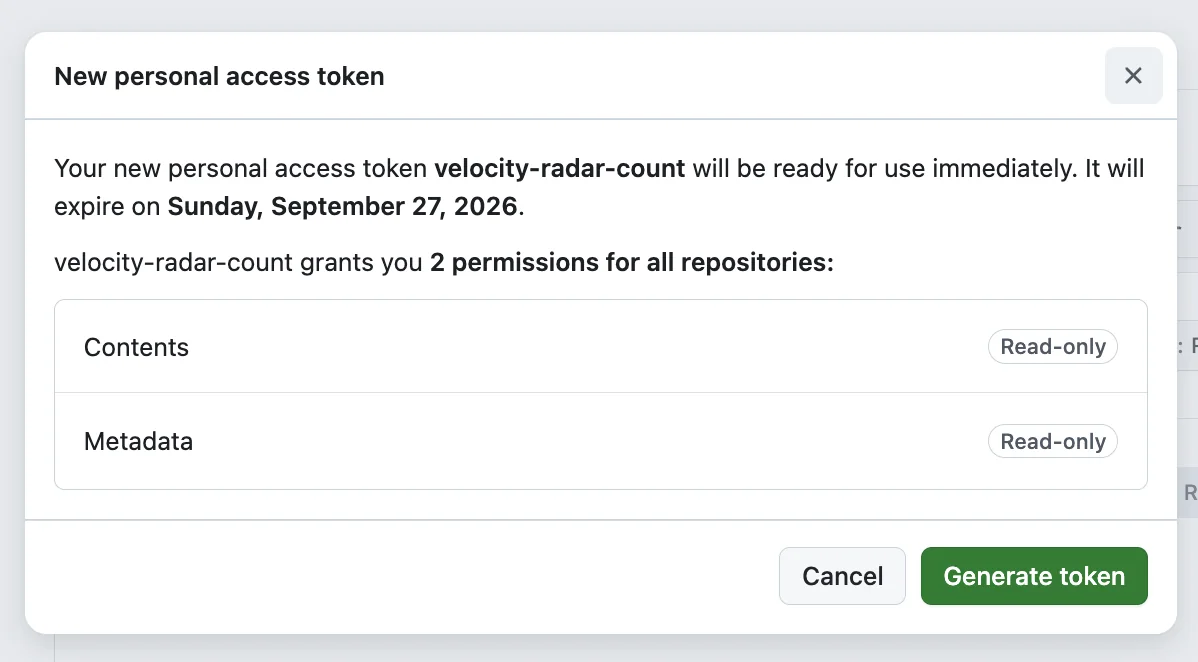
Generate a fine-grained tokenContents: Read-only · Metadata: Read-only · 7-day expiryOpen GitHub's token form
4
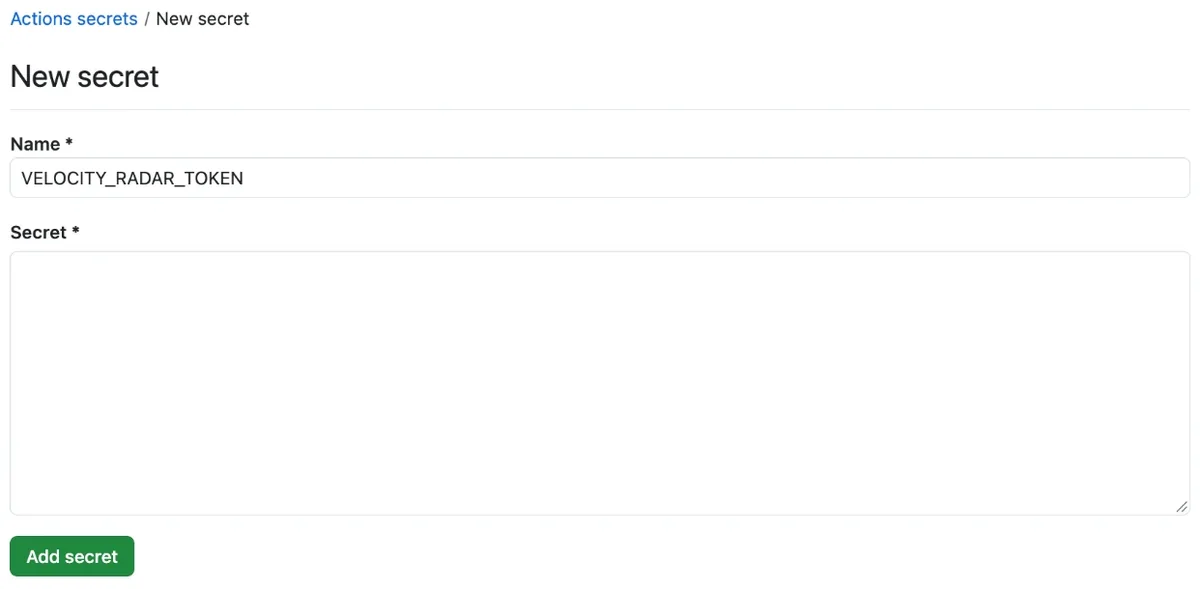
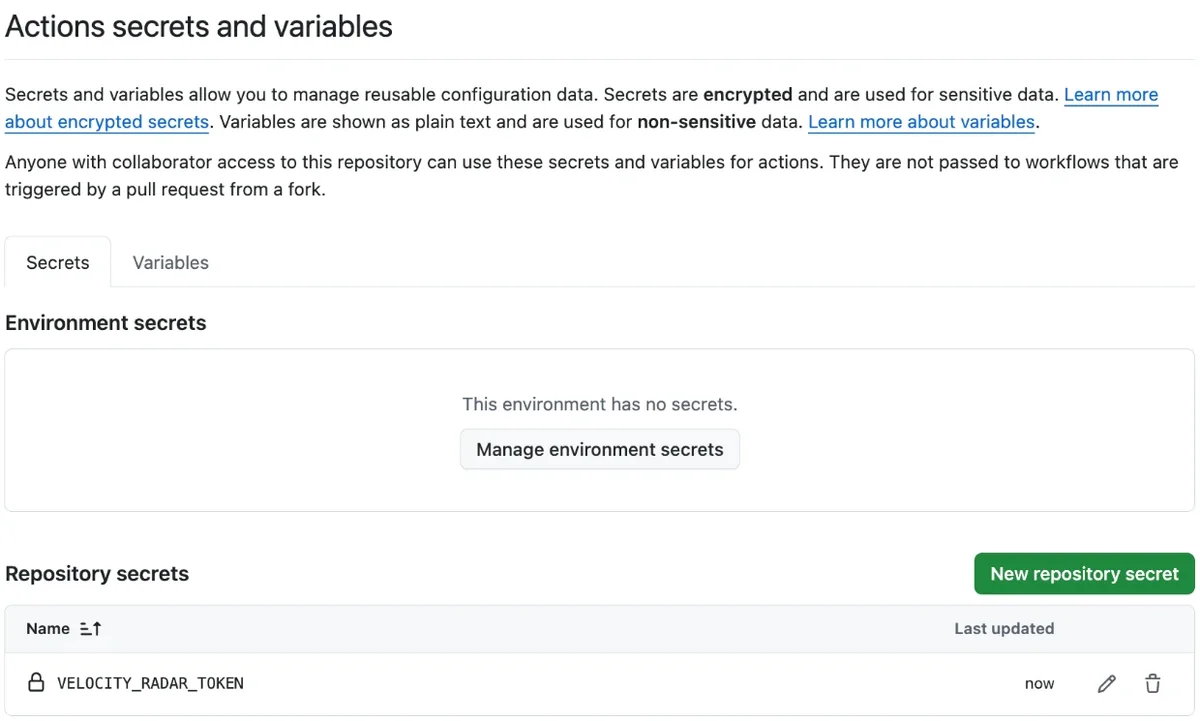
Save it as the Actions secret VELOCITY_RADAR_TOKENSettings → Secrets and variables → Actions → New repository secret, in your repository. Nowhere else.Open the new-secret page
5
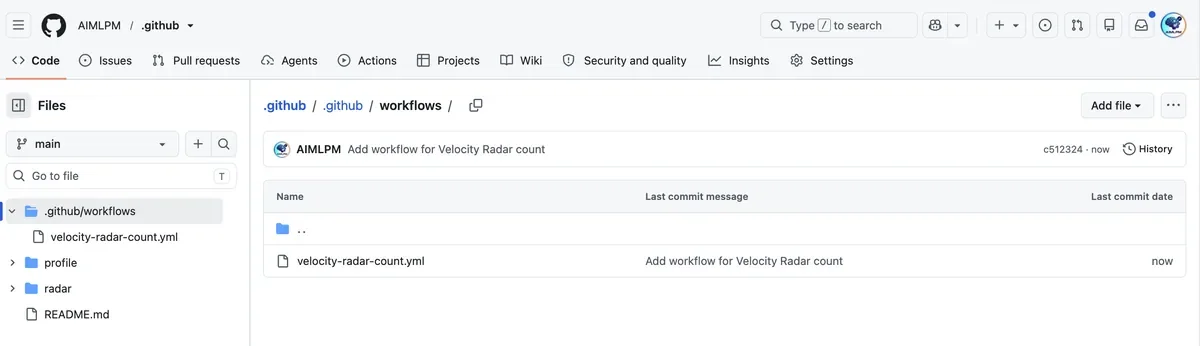
Commit the caller fileIt runs one file, our counting code, fixed at commit 33e9936. Read it
first if you like: inspect count.yml on GitHub..github/workflows/velocity-radar-count.ymlIt pins the published count to count.yml@33e9936, release v7.Create it on GitHub, filled in
6
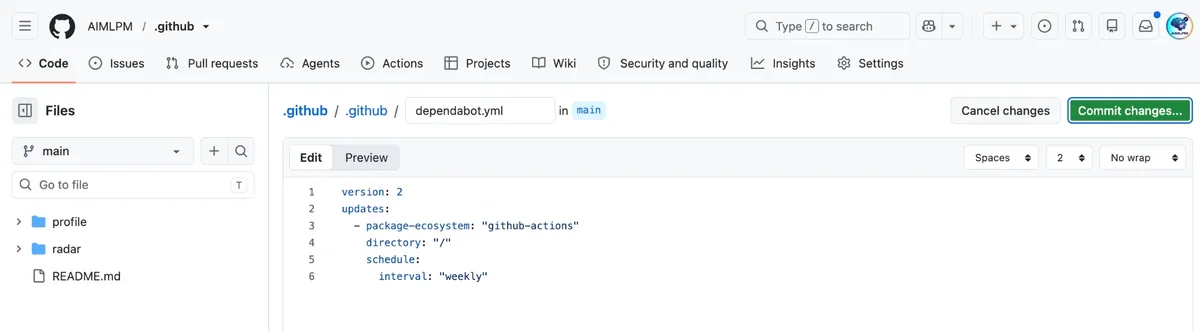
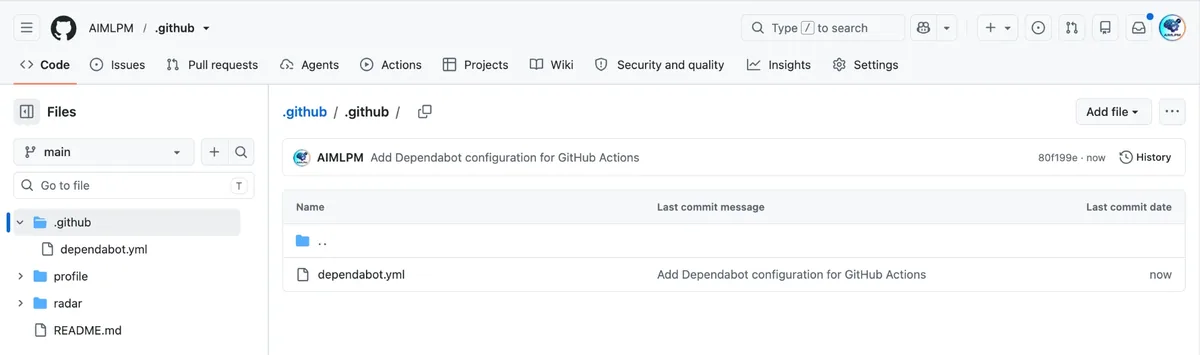
Add the Dependabot file.github/dependabot.ymlGitHub's Dependabot then tells you about each new release of the count with a pull request.
If GitHub says the file already exists, you use Dependabot already: add the
github-actions entry to your file instead (how).Create it on GitHub, filled in
7
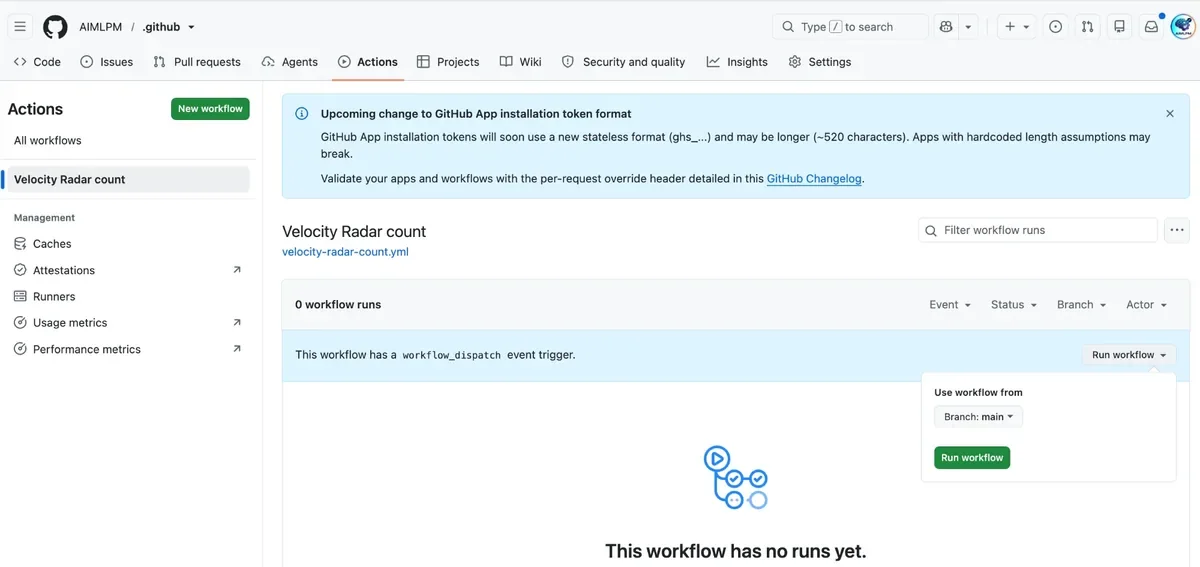
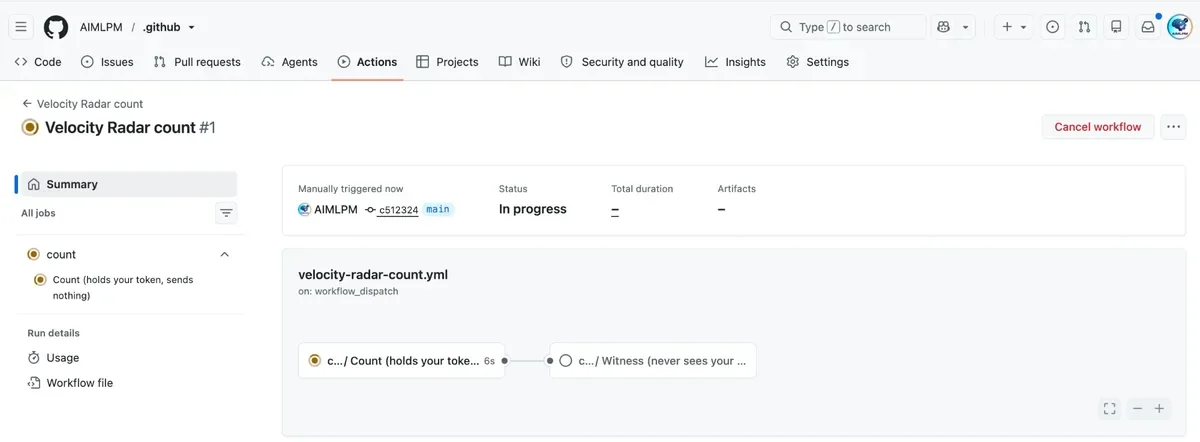
Run itRun workflow on the workflow page; it takes a few minutes, then press Check my run below.Open the workflow page
Check my run
When the run shows Success, press Check my run. Velocity Radar reads that
run back from GitHub, checks it is the published count and nothing else, and gives you a receipt.
Type your GitHub username at the top of the directions, and this page watches
GitHub for your run.
Pressing it sends your GitHub username and the repository to Velocity Radar, which reads your run's public
record and its log on GitHub: the totals, and nothing else. Your token never leaves GitHub.
Press Check my run before you delete the run: once it is deleted, there is nothing left to
read.
What it asks GitHub for
Only commits you authored, on the default branch of the repositories you choose.
For each one: its id, date, first message line, lines added and removed, and parent count.
The first line is used on GitHub's machine to sort the commit into merge, automated, micro or other.
Then it is dropped.
What it never touches
No files, diffs, or full commit messages.
No issues, pull requests, or anyone else's commits.
No list of when you commit is handed on: only where your longest run and longest stretch begin and end.
No outside actions or packages: one file, which you can read before you run it.
The figures appear in the run summary. The run sends nothing, so nothing leaves your account; press Check my run below and Velocity Radar reads them from the run, gives you a receipt, and your velocity.id8.one/stats page shows them while your snippet is on your profile.
Open GitHub's token form
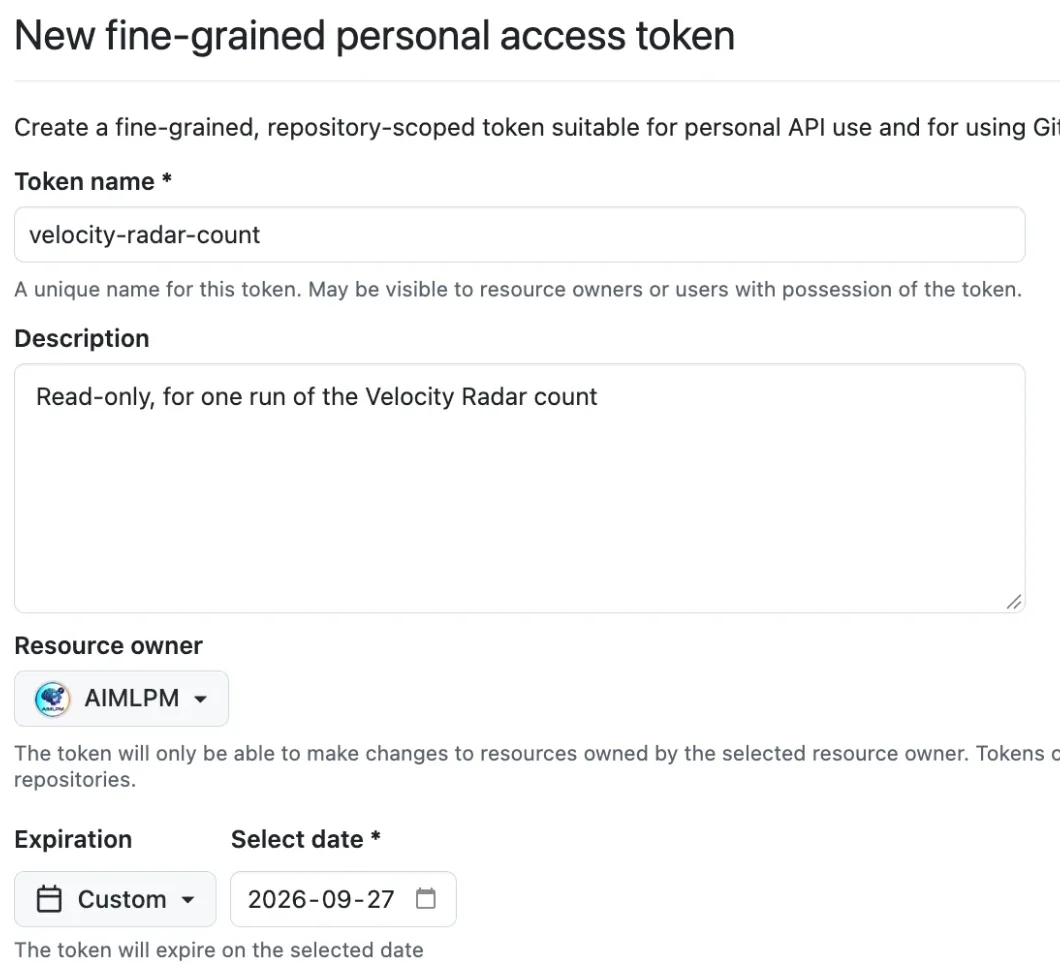
Press Open GitHub's token form. GitHub opens New fine-grained personal access
token with the name velocity-radar-count, a description and an expiry 7 days away
already filled in. Check that Resource owner is your own account.
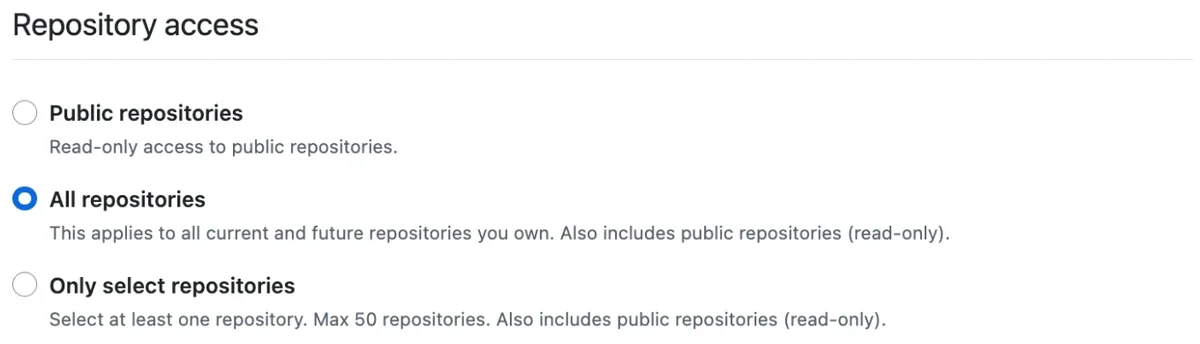
Under Repository access, choose All repositories. The count then
covers everything you own, so no repository is left out by choice. Only select
repositories also works, for up to 50. Either way the token can only read.
All repositories chosen.
Check the permissions
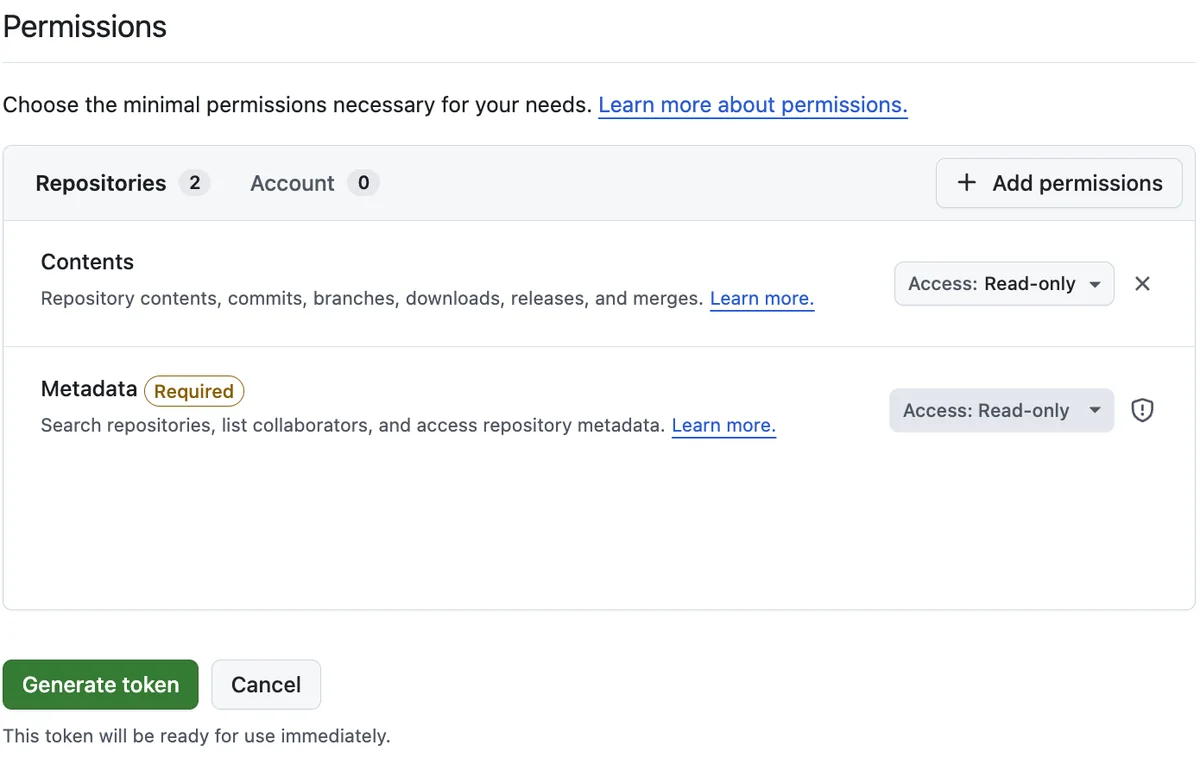
Under Permissions, the Repositories list shows two lines:
Contents: Read-only and Metadata: Read-only, which GitHub adds by
itself. Nothing else is needed. If Contents is missing, press Add permissions, choose
Contents and set it to Read-only.
Two permissions, both Read-only.
Generate the token
Press Generate token, then Generate token again in the box that asks you
to confirm. The box lists the same two permissions, both Read-only, and the expiry date.
The confirmation box.
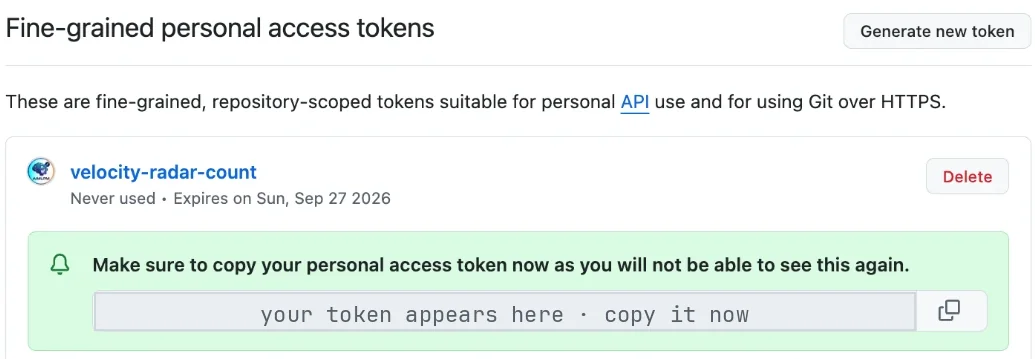
Copy the token
GitHub shows the token once, starting with github_pat_. Press the copy button beside it and
keep this tab open until the next step is done.
The token appears in the green box. It is covered in this picture.
The token never reaches Velocity Radar. It stays in your GitHub account, and the code
uses it on GitHub's machines inside that account.
Save it as an Actions secret named VELOCITY_RADAR_TOKEN
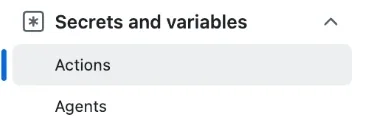
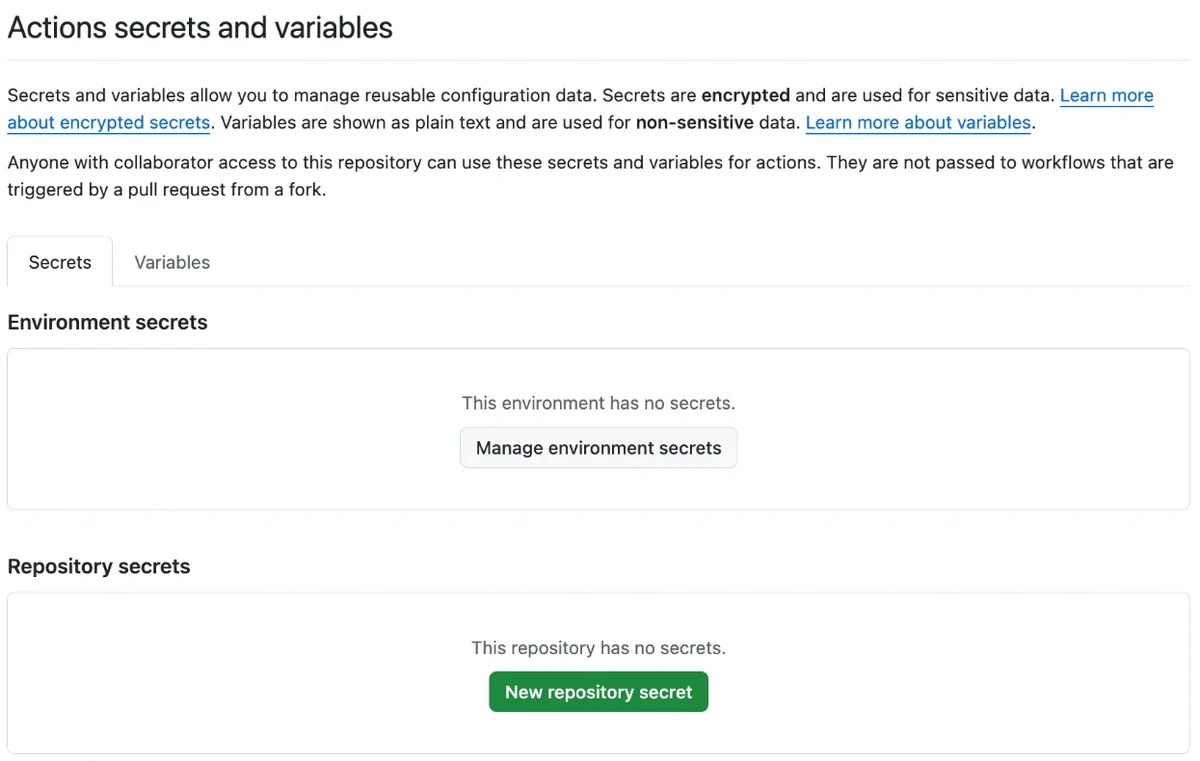
Press Open the new-secret page: it opens Settings → Secrets and variables →
Actions → New repository secret in your repository. Type
VELOCITY_RADAR_TOKEN as the name, paste the token as the secret, and press Add
secret. VELOCITY_RADAR_TOKEN then appears under Repository
secrets.
Do not add it under Agents, Codespaces or Dependabot, as a variable, or in any file. Only Actions →
Repository secrets.
The token can read the code in every repository you ticked, private ones included. Anywhere else it is
exposed or useless:
Agents secrets go to Copilot's cloud agent sessions.
Codespaces secrets go into every codespace opened on the repository.
Variables are stored as plain text.
In a file of a public repository, anyone on the internet could read your private code until the
token expires.
In all of those places the count cannot read it, so the run fails.
The right page's address ends in /settings/secrets/actions/new; one ending in
/agents, /codespaces or /dependabot is the wrong page. If the
token ever lands in the wrong place, delete it at
github.com/settings/personal-access-tokens and make a new one.
Open the new-secret pageWaiting for your GitHub username: type it at the top of the directions.In the settings menu, Secrets and variables → Actions is the right page. Agents, just below it, is not.If you arrive on this page instead of the form, press New repository secret.The form: the name typed in, the token goes in the Secret box.Saved: VELOCITY_RADAR_TOKEN listed under Repository secrets.
A public repository uses no private-repository Actions minutes.
Create the caller file
The caller file does one thing: it runs our counting code, count.yml, fixed at commit
33e9936, in your account. You can read that code before you commit anything.
Its first 27 lines say in plain words what it asks GitHub for and what leaves your account: nothing.
Most of the rest is our formulas file and its test cases, copied in full.
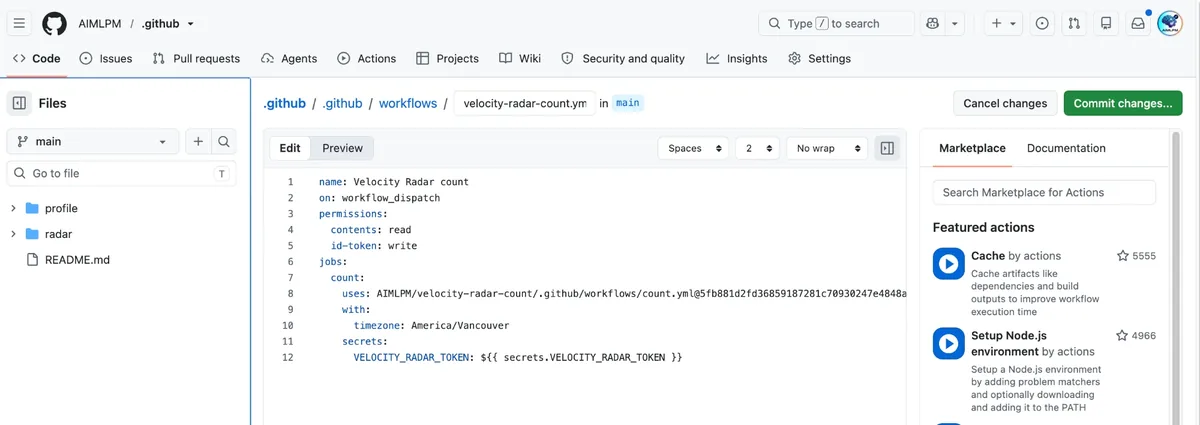
Press Create the file on GitHub, filled in. GitHub opens its editor with the name
.github/workflows/velocity-radar-count.yml and the text below already in it.
Before you commit, check two lines. Line 8 ends
count.yml@33e993618d8583e7aa329422aac458e85be8d73b # v7, and line 12 reads
VELOCITY_RADAR_TOKEN: ${{ secrets.VELOCITY_RADAR_TOKEN }}. If either differs, your browser
showed an older copy of this page: reload it and press the button again.
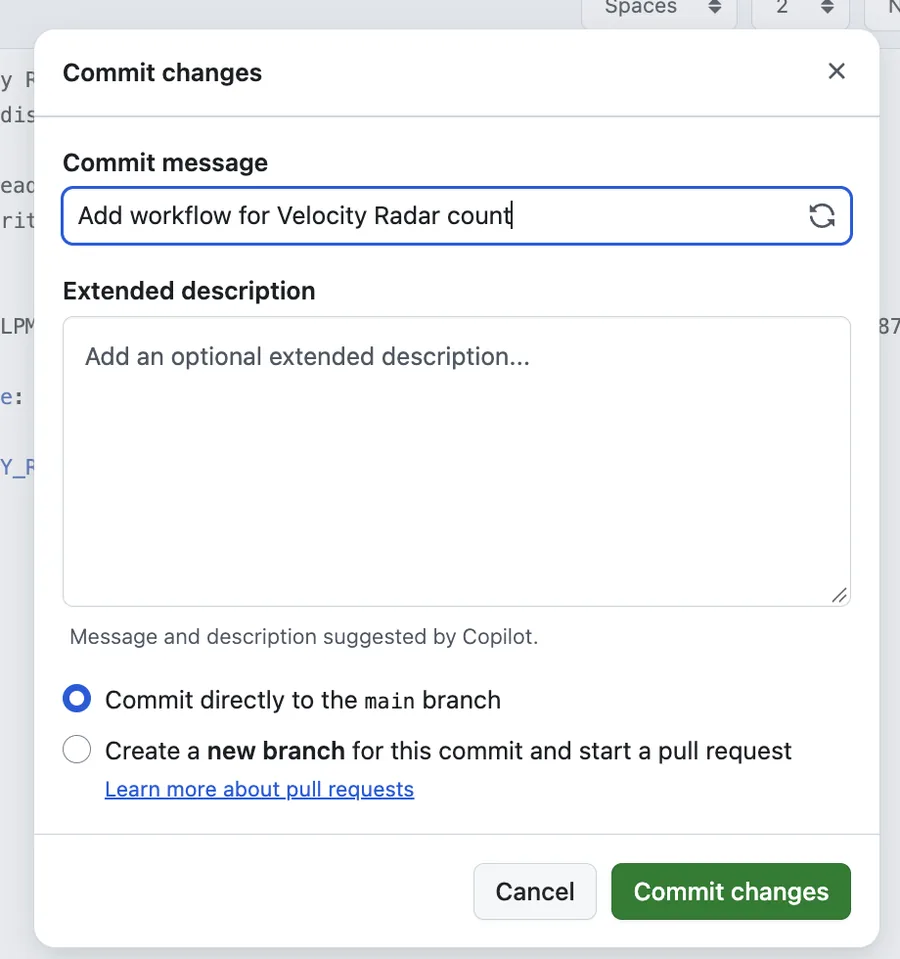
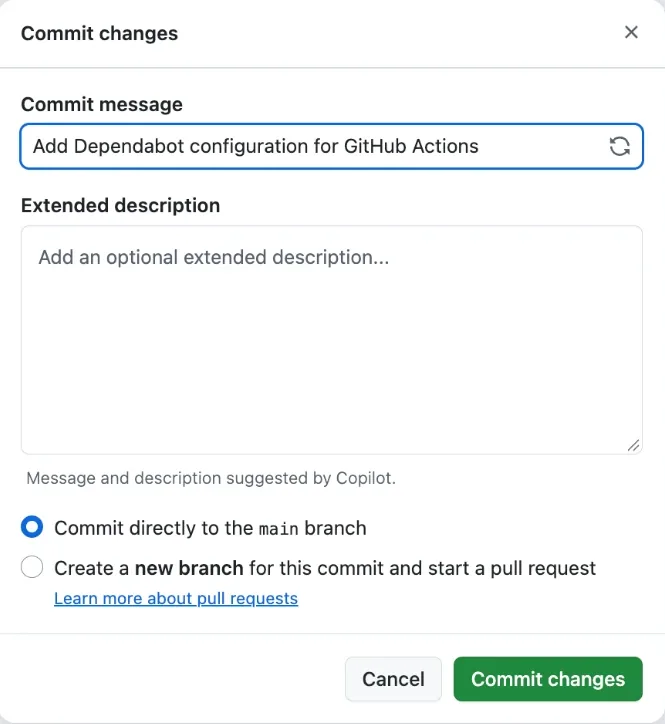
Then commit. Press Commit changes… at the top right, leave
Commit directly to the default branch selected in the box that opens, and
press Commit changes. The file then appears in the repository under
.github/workflows.
The box that opens: leave Commit directly to the main branch selected and press Commit changes.Committed: the file listed under .github/workflows.
If the editor opens empty, copy this text into it:
In the last line, the left side is the name the counting code reads and the right side is the secret you
created; both are VELOCITY_RADAR_TOKEN.
The uses: line pins the counting code to its full commit id; the
# v7 after it names that release, so Dependabot can offer the next one
(the next step). The two timezone
lines are optional. GitHub reports commit times in UTC, so the day, evening and overnight split needs
your clock; put your own zone there. Use a region name such as
Europe/Berlin, not an offset such as UTC+2, because offsets do not follow clock changes.
Delete both lines and the other results remain.
Add the Dependabot file
Your caller file is pinned to one release of the count, so a new release never reaches your account by
itself. This second file asks GitHub's Dependabot to tell you about each new release with a pull request
in your repository; nothing changes until you merge it. Press
Create it on GitHub, filled in, then Commit changes… and
Commit changes, the same way as the caller file.
Create it on GitHub, filled inWaiting for your GitHub username: type it at the top of the directions.GitHub's editor, filled in. Commit changes… is the green button at the top right.Leave Commit directly to the main branch selected and press Commit changes.Committed: dependabot.yml listed under .github.
If the editor opens empty, copy this text into it:
Dependabot then looks once a week. It looks at every workflow in the repository, so it also offers
updates for any other actions you use there.
If GitHub says a file with the same name already exists, you use Dependabot already.
Open your .github/dependabot.yml instead, and if it has no github-actions entry,
add these four lines at the end of its updates: list, lined up with the entries already
there:
Press Open the workflow page. Press Run workflow, then the green
Run workflow in the menu that opens. A new run appears at the top of the list within a
few seconds. It runs only when you press that button.
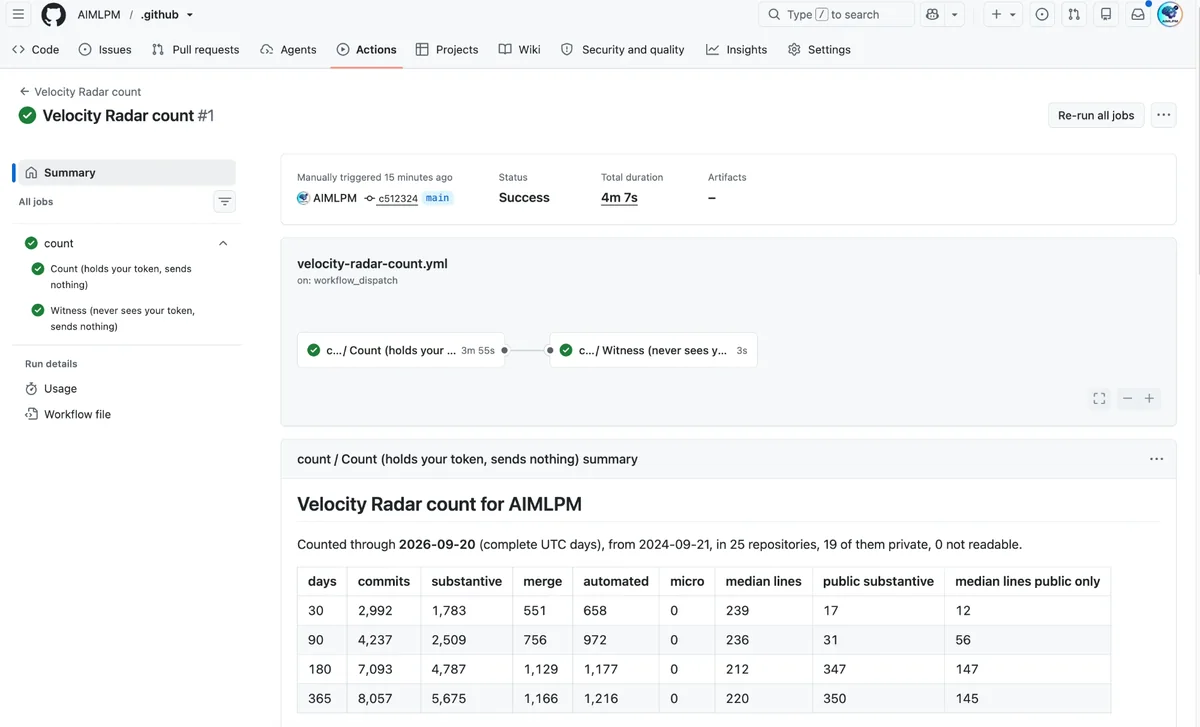
Open the run after a few minutes. Its summary shows 30, 90, 180 and 365-day totals for commits,
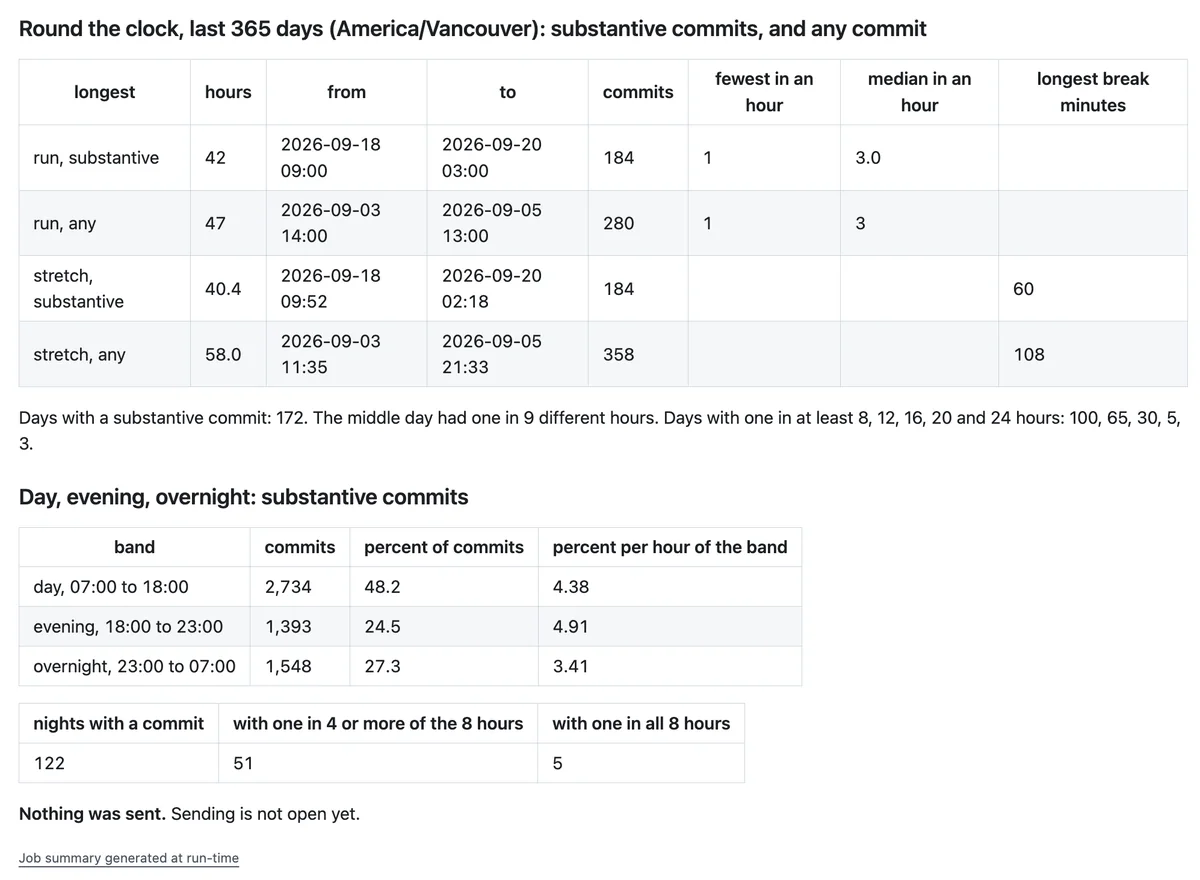
substantive, merges, automated, micro, and median lines per substantive commit. It also shows longest
runs, the day, evening and overnight split, commit size across all selected repositories against public
ones, job_workflow_sha, and runner_environment. The figures appear in the run summary. The run sends nothing, so nothing leaves your account; press Check my run below and Velocity Radar reads them from the run, gives you a receipt, and your velocity.id8.one/stats page shows them while your snippet is on your profile.
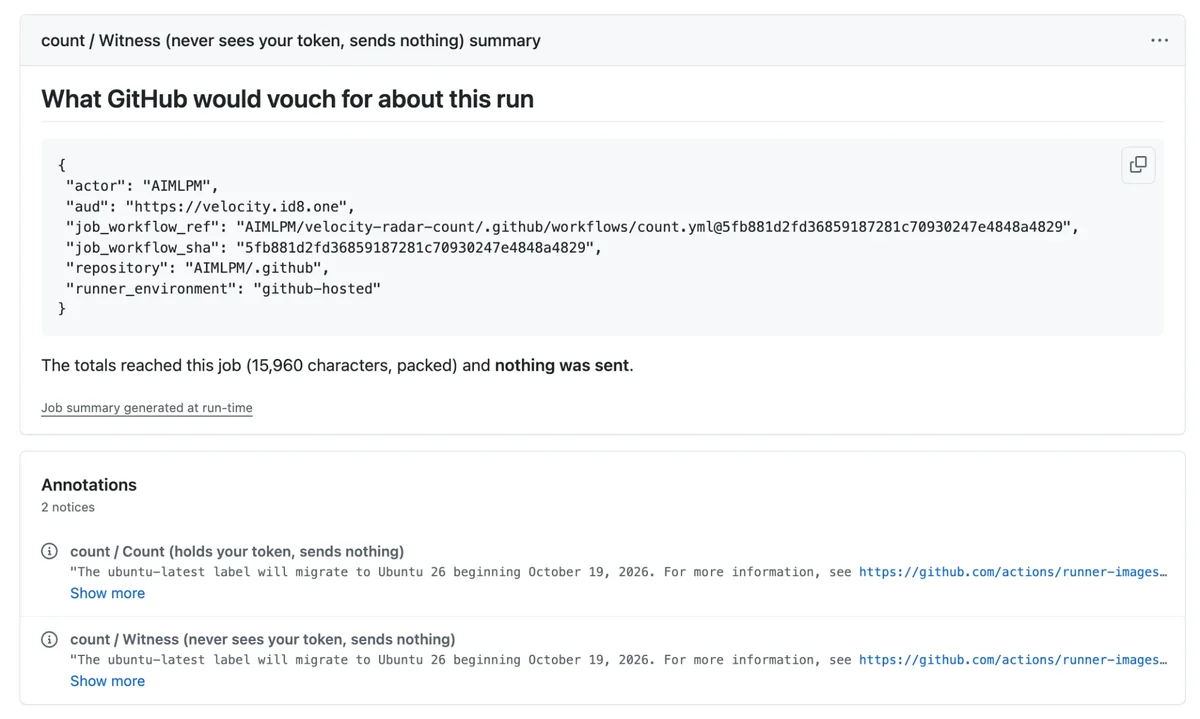
The finished run: Success, and the first table of totals.Further down: round the clock, and day, evening and overnight.The witness: what GitHub signs about the run. Nothing was sent.
The two notices at the bottom, about ubuntu-latest moving to Ubuntu 26, are GitHub's own and
can be ignored.
Anyone can open this run, because the repository is public. Besides those tables, the
summary shows how many repositories were read, how many of them are private and how many could not be
read. The second job's log holds the same totals in packed form, including your totals for each day
of the last two years. No repository names, commit ids, message text, files or code appear anywhere in
the run. To take the run down once you have read it, choose then delete the run under Choose where to run it.
Anyone can open this run until you delete it in the next step, because the repository is
public. Besides those tables, the summary shows how many repositories were read, how many of
them are private and how many could not be read. The second job's log holds the same totals in packed
form, including your totals for each day of the last two years. No repository names, commit ids, message
text, files or code appear anywhere in the run.
Delete the run
Open the run, press … at the top right, beside Re-run all jobs, choose
Delete workflow run, and confirm. The run, its summary and its logs are gone; the list of
runs no longer shows it. Deleting cannot take back what someone saw before, and each rerun needs deleting
again.
Delete it now rather than wait for it to expire, and make a new 7-day token for a later count. The caller
file can stay: without a valid token it can do nothing, and it never runs by itself.
It runs on GitHub's machines, not yours. Your browser only presses the start button, so
your computer can be off or closed while it runs. The run records nothing about your computer: no address,
no device.
It contacts two places, both GitHub. GitHub's API (api.github.com), with your
token, to read your own commits; and GitHub's signing service, from the second job, which never sees your
token, for a note signed by GitHub about the run. The note is addressed to velocity.id8.one, but today it is
only shown on the run page. The run contacts nothing else: not velocity.id8.one, not your computer.
Check my run is the one moment Velocity Radar reads anything. When you press it, Velocity
Radar asks GitHub for that run's public record, its caller file and its second job's log, checks them, and
keeps the totals with a receipt. It never sees your token, and it reads nothing else in your account.
The token is protected. GitHub stores it encrypted and masks it in logs. Only people with
write access to the repository can change the workflow that uses it. The job holding it has no other
permissions (permissions: {}). The counting code is pinned to one full commit id, so it cannot
change under you.
Who can see the run. In a public repository, anyone can open it: the summary's tables and
repository counts, and in the second job's log the same totals packed, including your totals for each
day. It never shows repository names, commit ids, message text, files or code. To remove it, open the run,
press … and choose Delete workflow run.
What GitHub would vouch for about this run. The second job shows what GitHub signs about
the run: who started it (actor), in which repository (repository), the exact
published counting code (job_workflow_ref and job_workflow_sha), and that it ran
on GitHub's own machine (runner_environment: github-hosted). That signature is how Velocity
Radar will be able to trust your totals without seeing your account.
Snippet only and full telemetry, row by row
Snippet only and full telemetry, row by row
Difference
Snippet only
Full telemetry (snippet + count)
What you do
Paste the snippet into your profile README.
Also add a workflow file, store a read-only token as a GitHub secret, and start the workflow yourself.
What is read
Your public profile and GitHub contribution record: daily totals, public and opted-in private totals,
and contribution types. No commits are opened for a new, unscreened profile.
Commits you authored on the default branches of the repositories you select: id, date, first message
line, additions, deletions, and parent count. Every one is sorted; selected private repositories are
included.
What leaves your GitHub account
GitHub returns the profile and contribution fields used to draw the public page. You give Velocity
Radar no access token.
Nothing, from the run itself. When you press Check my run, Velocity Radar reads the figures from the run's public log on GitHub; your token and commit records stay in your GitHub account.
30, 90 and 180-day figures
Not shown: GitHub's contribution record has daily totals, not commits.
The run summary counts each range separately, plus 365 days.
Private work
GitHub supplies one opted-in private contribution count, without a private commit breakdown; public
commit figures remain public-only floors.
Commits in the selected private repositories are counted directly.
Commit size
Not available: no commits are read.
Median lines changed for substantive commits, for 30, 90, 180 and 365 days.
Hours and longest run
Not available: the contribution record has daily totals, not commit times.
The run summary shows the longest runs, hours of the day, and day, evening and overnight bands when a
time zone is supplied.
Momentum strips
The public page shows contribution momentum. It has no real-data substantive or commit-size strip.
Your public page adds a counted strip: substantive commits per active day, in the same stretches of 30 active days, worked out in your run.
How figures are marked
Every chart from GitHub's record carries a GitHub record badge.
Counted parts carry the iD8 counted badge and the date the count reached.
Run it again
Fully automatic after you add the snippet: the graph and the page update by themselves.
Make a new token, replace the secret, and manually start the workflow again.
Remove it
Remove the snippet. A later profile check takes the public page down.
Delete the token or let it expire. The workflow never starts by itself.
Read the code first
The counting code is one public caller file. Read it before you add the caller to your account. The only place
it talks to GitHub is in that pinned file. The commit id is:
33e993618d8583e7aa329422aac458e85be8d73b
A full commit id names fixed code. The same id appears in your caller file and in GitHub's account of the run.
Leave the caller file in place. Make a new 7-day token, replace the VELOCITY_RADAR_TOKEN secret, and press
Run workflow again. From a terminal:
gh secret set VELOCITY_RADAR_TOKEN --repo octocat/octocat
gh workflow run "Velocity Radar count" --repo octocat/octocat
What a count can and cannot show
It shows how many commits you authored, their category, and their size. It says nothing about what they contain.
It covers only repositories the token can read. The run summary states how many were read and how many could not be read.
Days are UTC days, and only complete days are counted.
A count describes Git activity. It does not measure product use, customers, revenue, or the value of the work.
Remove the snippet
Delete the snippet from your profile README. Velocity Radar checks confirmed profiles again; after a later
check, the page and graph are no longer public.
When a new release comes out
The count gets a new release when its method changes. If you added the
Dependabot file (step 4 of the setup), this is what happens then.
Read the pull request, then merge it
Dependabot waits until a release is 3 days old, then proposes it at its next weekly look, so the pull
request arrives 3 to 10 days after the release. It opens in your repository
and changes one line of
your caller file: line 8, to the new release's commit id and name. Its Files changed tab
shows exactly that. Merge it to take the new release, or close it to stay on yours. If it changes anything
else, close it.
The new release counts only once it runs. Make a new 7-day token and save it as the secret VELOCITY_RADAR_TOKEN, as in the steps above, run
the workflow, then press Check my run for a new receipt.